What a 128 GB Mac can run, how I locked it down, and what happens when the model doesn’t fit.
Disclaimer: An early draft of this post was generated by Claude from my project notes, benchmark results and records. I edited it from there.
In an earlier post I mentioned two Qwen models running on my Mac Studio that did the reading for a team of AI agents. This post is about that machine: an Apple M5 Max with 128 GB of unified memory, set up as a private AI workstation.
I wanted two things from it. First, an assistant in the spirit of Muse that I and a couple of people close to me can use from our phones, where nothing we type leaves the house. Second, a replacement for some of my cloud coding tools: local models that do real work, driven by the same agent harnesses I use with hosted models.
I built it the way I ran the kernel contest. Claude did most of the typing; I set the rules, made the calls, and checked the results. The first day, Oct 18, was 31 commits: benchmarks, a chat UI on my tailnet, and a sandbox. The rest has been a month of using it, finding what broke, and pushing on the edges, most recently a 594-billion-parameter model on a 128 GB machine.
The rules
I gave the project a short list of constraints up front, and most of the design falls out of them.
- Chats stay on the machine. The chat UI can fetch web pages from an allowlist, and Claude, which is hosted, sees the coding work it builds or reviews. Every benchmark reads local weights with
HF_HUB_OFFLINE=1. - No Docker and no VMs except Apple’s own
containertool, which runs each container as a lightweight VM. - Small, self-written tools in Swift, Python stdlib or Rust, instead of large third-party stacks. Ask before installing anything.
- Pin everything. Every runtime and container image is pinned by version and sha256 (or OCI digest), and nothing auto-upgrades. A version change is a proposal with a changelog and a security note.
- Signed commits with a key in the Secure Enclave. When I asked for this, I said not to download anything: “it’s very simple to write one with Swift”. So there’s a small Swift tool, se-sign, that signs git commits with a Secure Enclave key and has since grown a gated ssh-agent.
- Telemetry on every benchmark: CPU, GPU, ANE and power, through macmon without sudo.
- Verify every launch. After starting anything, confirm it’s actually running: the process, a health check, a log that’s growing. This rule came from experience, and it kept paying off.
- I do the sudo. System settings, security settings, admin installers and account sign-ins are mine. Claude files them in a Linear issue and waits.
The stack
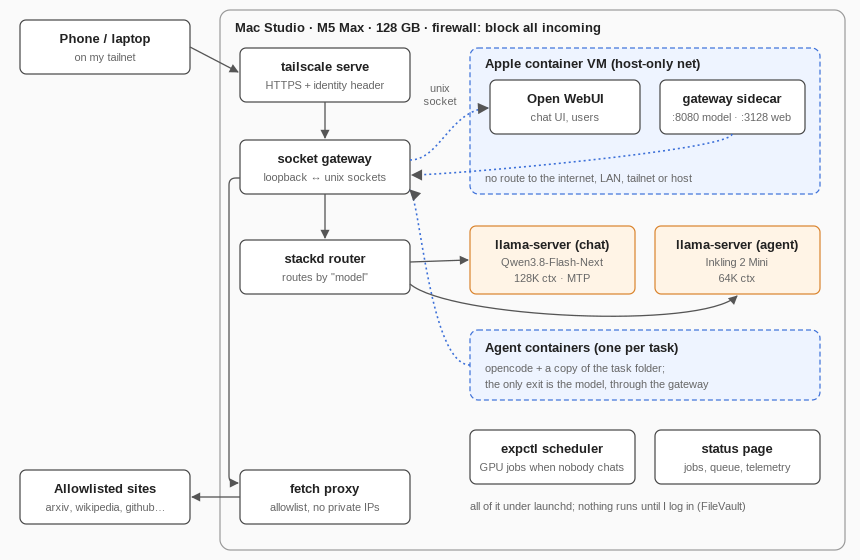
Here’s what runs, top to bottom:
| Component | What it does | Size |
|---|---|---|
llama.cpp llama-server | Serves the chat model (Qwen3.8-Flash-Next, 128K context, speculative decoding) and an agent model (Inkling 2 Mini, which replaced Qwen3-Coder-30B this week) side by side | prebuilt release, pinned |
| stackd | A small router in front of both: streams responses byte for byte and routes by the request’s "model" field | 167 lines, Python stdlib |
| Open WebUI | The chat UI, in an Apple container on a host-only network | pinned image digest |
| Socket gateway | The only way in or out of the containers (more below) | 225 lines, Python stdlib |
| Fetch proxy | Lets the chat UI fetch web pages from an allowlist, and nothing else | 173 lines, Python stdlib |
Tailscale serve | HTTPS on my tailnet only, with the user’s identity in a header | pinned installer |
| expctl | A scheduler that runs GPU experiments only when nobody is chatting | 391 lines, Python stdlib |
| Status page | Jobs, queue, failures and telemetry, for me and the people I share the machine with | 623 lines, Python stdlib |
| Agent containers | One throwaway container per delegated coding task | 113 lines + a 7-line Containerfile |
The first prototype was in Python, and it’s being rewritten in Rust so the binaries are portable. So far the router and the host side of the gateway have moved over; the sizes above are from the Python version.
Everything runs under launchd. The disk is encrypted with FileVault and there’s no auto-login, so nothing starts until I log in.
Locking it down
The interesting part of the security model came from a constraint I didn’t plan for. The macOS firewall is set to block all incoming connections. That turns out to block TCP between the host and its own container VMs too, in both directions: the container couldn’t reach the model server, and publishing a container port on localhost gave “connection reset by peer”.
Rather than loosen the firewall, Claude built a gateway over Unix sockets. Apple’s container run --publish-socket exposes a socket from inside the container on the host. A small host process keeps a pool of connections dialed into each container. When the container wants out, its sidecar claims one of those connections, and the host pipes it to a target that’s fixed on the host side: the model, or the fetch proxy. Inbound chat traffic goes the same way in reverse.
The result is that a container can reach exactly two things, the model and the proxy, and it can’t name any others. Not the internet, not my LAN, not my tailnet, not other ports on the host.
The fetch proxy is the only path to the web. It allows hosts on a live-reloaded allowlist (arxiv, Wikipedia, GitHub to start), refuses raw IPs, and refuses any host that resolves to a private, loopback, link-local or tailnet address. It then connects to the IP it vetted, so a DNS answer can’t change between the check and the connection.
Authentication is Tailscale’s identity header. tailscale serve adds the visitor’s tailnet login to every request; Open WebUI trusts it, the first user became admin, and anyone else lands as pending until I approve them. A password sign-in without the header is refused.
That header is also the main weak spot: any process on the Mac that can reach Open WebUI’s local port can forge it. That’s why agents only ever run inside containers, which can’t reach that port.
A 22-check script proves all of this from scratch:
- the firewall mode, and that every service listens on loopback only;
- the API returns 401 without its key;
- a header-less sign-in is refused;
- from inside a container, the model is reachable while the internet, the LAN, the tailnet and the host bridge are not;
- the proxy allows arxiv and refuses example.com and raw IPs;
- an agent container reaches nothing at all.
Picking a model
On day one I benchmarked seven models with llama.cpp’s llama-bench. Every model got the same grid: a 2,048-token prompt and 128 generated tokens, at four context depths, three reps each, all layers on the GPU. For calibration: the M5 Max’s 40-core GPU has 614 GB/s of memory bandwidth, and where public llama.cpp numbers exist for these models on the same chip (gpt-oss-120b, Gemma 4), mine land within about 10%. Prompt reading is roughly 3× what older llama.cpp builds report on the M5 Max, because newer builds use the GPU’s neural accelerators (llama.cpp’s Apple Silicon thread).
Generation speed (tokens/s) as the context fills up:
| Model | Quant | 0 | 8K | 32K | 64K |
|---|---|---|---|---|---|
| Qwen3-Coder-30B-A3B | Q5_K_M | 140 | 104 | 57 | 37 |
| Qwen3.6-35B-A3B | UD-Q5_K_M | 109 | 102 | 88 | 73 |
| gpt-oss-120b | MXFP4 | 109 | 98 | 73 | 56 |
| Gemma 4 26B-A4B | UD-Q4_K_M | 106 | 93 | 77 | 61 |
| Qwen3-Coder-Next | Q4_K_M | 96 | 63 | ||
| Qwen3.8-Flash-Next | UD-Q3_K_XL (90 GB) | 47 | 46 | 44 | 43 |
| Gemma 4 31B (dense) | Q4_K_M | 26 | 16 |
Qwen3.8-Flash-Next is the slowest of the mixture-of-experts models on an empty context, and by far the flattest, losing 10% from an empty context to 64K while the others lose between a third and three quarters. Prompt processing shows the same pattern: 1,033 → 852 tokens/s, while Qwen3-Coder-30B drops from 2,986 to 352.
At 120K tokens of context, Qwen3.8 still generates 39 tokens/s; Coder-30B is down to 22. Since a personal assistant spends its time on long documents and long chats, Qwen3.8 became the chat model.
A few more results shaped the setup:
- Prompt caching is huge. Asking a second question about the same 31K-token document skips almost all the work: time to first token drops from 13–65 s to 0.06–0.6 s, 41 to 362 times faster. The catch is one slot: if someone else chats in between, the cache is gone.
- Speculative decoding (MTP) lets Qwen3.8 draft a few tokens ahead with a small extra module and verify them in one step. It averages 1.48× at 3 draft tokens and 1.59× at 5. Code and JSON reach 1.9× (89 tokens/s); prose gains 1.1–1.3×. It needs the full MTP module; the “shared” variant failed to load. On by default. I only measured generation; one public test of llama.cpp’s MTP on an M2 Ultra (Qwen3.6-35B) saw 1.07–1.14× generation and about 17% slower prompt reading, which matches my prose numbers and is worth checking before turning it on for long documents.
- A real 128K chat works. A 104,742-token document loaded in 137 s with exact recall. Follow-up questions on it came back in under a second from the cache, and memory peaked at 78 GB.
- KV cache at 8 bits is nearly free on the Qwen and gpt-oss models (0–4% slower at 64K), but costs Gemma 18–20%.
- Two models fit at once. Qwen3.8 and Coder-30B together peak at 108.5 GB with no new swap, for about 1.85× the machine’s total throughput. So the chat model and the agent model now run side by side. The agent model is now Inkling 2 Mini, which is smaller still (18.5 GB in memory).
- The Neural Engine sat idle (0 W) in every llama.cpp run. The GPU ran at 90–98%, and the whole machine drew 120–140 W.
Speed isn’t quality, so Qwen3.8 also got a 20-prompt qualitative round with code and shell answers actually executed. It scored 14 pass, 5 partial and 1 fail. The one fail was a shell one-liner using GNU head syntax that doesn’t work on macOS. The partials were the kind of thing you’d catch in review: 133 words for a 120-word limit, a percentage of the wrong base, stiff Nepali.
It was strong where I care most: it refused a false premise, didn’t invent a Nobel winner, and its code passed seven extra edge cases. Two quirks needed fixes. Inside Open WebUI it claimed to have search, calendar and memory tools it didn’t have (fixed with a system prompt). It also refused to read back a planted “CONFIDENTIAL” note from my own document until I told it the document was mine.
Sharing one GPU
A Mac Studio has one GPU, and a benchmark grid wants all of it for hours. I didn’t want to schedule experiments around other people’s chats, so I asked for the opposite: “When nobody is logged in we should continue with them from our backlog,” and when someone opens the chat, pause the experiment and let them chat.
That’s expctl. Experiments sit in a JSONL backlog. Someone counts as “present” if Open WebUI saw a request in the last 10 minutes (the gateway touches a file on every inbound request) or the chat model’s token counters moved. The scheduler checks every 3 seconds:
- When the machine has been idle for 10 minutes, it stops the chat model, runs the next GPU job, and records the result.
- When someone shows up, it kills the job’s whole process group within about 3 seconds, requeues the job, and brings the chat model back.
- Jobs resume from checkpoints where they can.
It grew two more kinds of jobs during the kernel contest:
- chat jobs run while idle with the chat model up, because the local model is their worker;
- remote jobs (GPU runs on Modal) run any time, because they use nothing local.
The status page shows all of it: who’s present, what’s running with a log tail, recent failures, the queue, and telemetry sparklines. One early bug: refreshing the status page counted as presence, so watching the experiments kept them from running. Health checks now go over the Unix socket instead.
Bigger than memory
The question I most wanted answered was whether the SSD can stand in for memory. The internal 2 TB SSD reads at up to ~12.7 GB/s sequentially (PetaPixel’s Blackmagic test of the same capacity; smaller drives are about half that), and my own uncached test, counting what the disk actually delivered, topped out at 13.4 GB/s with 512 KB random reads and 16 or more in flight (2.4 GB/s with one at a time). DwarfStar’s streaming peaked at 10.5 GB/s, which is a lot less than unified memory’s bandwidth but a lot more than nothing. A mixture-of-experts model only touches a few experts per token, so maybe the rest can live on disk.
| Experiment | Size | Result |
|---|---|---|
| Qwen3.8 UD-Q4_K_XL, all on GPU | 111 GB, just under Metal’s 115 GB limit | 46.0 tokens/s, −3% vs the 90 GB quant |
| Qwen3.8 UD-Q5_K_XL, memory-mapped | 158 GB, more than RAM | 44.3 tokens/s, 975 prompt tokens/s (3 reps) |
Same, with experts on the CPU (--n-cpu-moe 8/16/24) | 158 GB | 31 / 20 / 19 tokens/s: strictly worse |
| DeepSeek-V4-Flash Q2 in DwarfStar, resident | 81 GB | 39–42 tokens/s (DwarfStar’s own M5 Max baseline: 39.4 at 2K context) |
| Same, streaming experts from SSD | 81 GB | 19–28 tokens/s |
| DeepSeek V4.1 Flash Q2 in DwarfStar, SSD streaming | 366 GB on disk, ~2.7× RAM (163 GB of weights + 203 GB of Engram lookup tables) | 16–20 tokens/s, 6.3 GB/s average from the SSD, RAM peak 70 GB |
The first surprise was the 158 GB model. It ran at full speed because the experts it actually uses stay in the page cache, and llama.cpp’s memory-mapped loading handles the rest. The first run was only 9 seconds long and the number looked too good, so I had it rerun longer; it held. For this model, the higher-quality quant was effectively free.
The second was DwarfStar, antirez’s Metal inference engine with explicit SSD streaming. It ran a 366 GB DeepSeek model on a 128 GB machine at 16–20 tokens/s. To be fair about the size: per DwarfStar’s model notes, 203 GB of that file is Engram lookup tables it reads only as needed, so the part that behaves like ordinary weights is 163 GB, still well past RAM. That’s slow for chat, but it runs, and the machine stayed usable (no new swap). Its first run failed instantly because it looks for its Metal shaders relative to the current directory. The script still exited 0, so the scheduler recorded the failure as done.
Inkling 2 Small: 594 billion parameters
Then Thinking Machines released Inkling 2 Small. “Small” is relative: 594 billion parameters, 17 billion active per token, 1M context. The smallest quant that comes close to fitting is bartowski’s IQ1_S at 127.5 GB, so it became the stress test. When I ran it, I couldn’t find any published Inkling 2 Small speeds on a Mac. The closest public report is for the original, 276B Inkling-Small at Q3 on an M5 Max (25–31 tokens/s, via Kingy AI), a model less than half the size.
Getting it onto the disk. The pinned llama.cpp predates the inkling2 architecture, so it got a second, newer pin (b12600) next to the old one; the live services didn’t change. The first download ran at 1 MB/s, about 32 hours for 128 GB.
It turned out Hugging Face’s CDN speed varies wildly per connection: 0.8 MB/s and 21 MB/s on the same file at the same moment. The fix was a ranged downloader: 256 MB segments, 24 connections, each segment written at its offset into a preallocated file, then the usual sha256 check. The 128 GB came down in about an hour.
It had one bug. After a restart, a preallocated file looked complete, so the fetcher counted holes as downloaded. The checksum would have caught it, but only at the very end.
Getting it to run. It didn’t fit. Metal lets the GPU use about 107.5 GiB of the 128, and the weights alone are 118.7 GiB. I had two options:
- Raise the cap with
sudo sysctl iogpu.wired_limit_mb=…so the GPU can pin ~121 GiB. That might be the fast way, but only for short contexts, since the weights take 118.7 of it. Pinned memory also can’t be reclaimed, so macOS and everything else would live in the last few GB. The worst case is a frozen machine. - Keep some experts on the CPU (
--n-cpu-moe): slower, but nothing extra is pinned, so memory pressure slows things down instead of locking up.
I went with the second and never raised the cap. I didn’t want to risk the machine’s stability, and I wanted to keep it flexible for everything else I use it for. Experts for 8 of the 48 layers on the CPU ran at 30 prompt / 15 generated tokens/s, until the 32K-context test ran out of GPU memory. The grid script swallowed the error and reported success; I only caught it by checking the rows.
A verbose load showed why. At 124K context, the GPU needed 98.1 GiB of weights, 4.1 GiB of KV cache and 24.7 GiB of compute buffer. The KV cache is small because 40 of the 48 layers only look back 1,024 tokens. The compute buffer grows with the batch size.
So: experts for 10 layers on the CPU and batches of 128 tokens. That’s 93.2 + 4.1 + 6.9 = 104.2 GiB, which fits at 124K. It was also faster than the first setting, presumably because the smaller buffer relieves memory pressure more than two more CPU layers cost. llama.cpp’s own auto-fit found a working setting too, but a much slower one (16.8 prompt and 3.7 generated tokens/s in a short test).
| Context | Prompt tokens/s | Generated tokens/s |
|---|---|---|
| 0 | 46.8 | 18.7 |
| 8K | 42.7 | 17.4 |
| 32K | 31.4 | 15.8 |
| 64K | 12.4 | 11.9 |
It holds up at depth: with 120K tokens already in context it still runs at 7 tokens/s each way, and it never ran out of memory. A prompt you reuse is cheap: after one 34K-token prompt (read in about 5 minutes), asking again with the same prefix got a first token in 2.7 seconds. Two other results surprised me. Batching barely helps: 8 requests at once only reach 21 tokens/s in total, because with experts split across CPU and GPU, decoding is bound by moving expert weights. And an 8-bit KV cache was no slower, slightly faster at 32K and 64K, since with only 8 full-context layers the cache is small either way.
Then the part I expected to be bad: quality at 1.56 bits per weight. On the same 20 prompts I gave Qwen3.8, Inkling scored 17 good, 2 partial, 1 failed (Qwen3.8: 14, 5, 1). It kept to the word limit, invented nothing, and both coding answers passed extra tests. Its one failure was the same kind as Qwen3.8’s: a macOS shell one-liner written with GNU habits (BSD stat prints a literal \t). The catch is time. Its median answer took 38 seconds, against 8 for Qwen3.8. It’s the model I’d ask a hard question and go make coffee, not the one I chat with.
The quant that doesn’t fit. Then I deleted it and ran unsloth’s larger UD-IQ1_S: 171.7 GB, more than the machine’s RAM. Putting the experts of 32 of the 48 layers on the CPU was the fastest of the four settings I tried (24 ran at 3.8 tokens/s, 32 at 7.0, 40 at 6.8, 48 at 5.6).
| Context | Prompt tokens/s | Generated tokens/s | IQ1_S, generated |
|---|---|---|---|
| 0 | 18.1 | 7.0 | 18.7 |
| 8K | 21.0 | 7.0 | 17.4 |
| 32K | 16.5 | 6.4 | 15.8 |
| 64K | 12.4 | 6.4 | 11.9 |
| 120K | 6.0 | 4.4 | 6.9 |
(The 32K, 64K and 120K rows are single runs, for both quants.) A fresh 34K-token prompt took 16 minutes to read instead of 5, and reusing it 26 seconds instead of 2.7. Eight requests at once reached 8.6 tokens/s in total. The GPU was busy only 48% of the time in the main speed test, so I measured the disk in a later run. While it generated text, the GPU was about 10% busy and the disk delivered 675 MB/s, as roughly 29,000 small reads and writes a second (24 KB each). The same drive does 13.4 GB/s in my 512 KB test, so it isn’t running out of bandwidth; it looks like a long stream of small page-ins, though I didn’t isolate the cause. Compare the 158 GB Qwen, which ran at full speed from the page cache: being bigger than RAM isn’t the problem by itself. What matters is how much of the file each token touches.
It didn’t buy better answers either: 14 good, 4 partial, 2 failed, against 17, 2 and 1 for the smaller quant. One run of 20 prompts can’t tell those two scores apart, but it’s no case for a model with a median answer of 139 seconds. It claimed a “reasoning tool” it doesn’t have, gave a current date that contradicts its own cutoff, and never answered the shell question: that one hit my 15-minute timeout, and the run still reported success. I reran that one prompt two days later and it answered in 12 minutes, correctly. I didn’t change the score, since no other model got a second try. On this machine, IQ1_S is the one to use.
What it costs on disk
Memory is the limit you plan for; disk is the one that sneaks up. A month of trying models left 1.59 TB of weights on a 2 TB drive that was 97% full. On Nov 24 I sorted them:
| What | Size | Decision |
|---|---|---|
| Qwen3.8-Flash-Next UD-Q3_K_XL, with its vision and MTP files | 95 GB | Keep: the chat model |
| Inkling 2 Mini IQ4_NL | 18 GB | Keep: the agent model |
| Qwen3-Coder-30B Q5_K_M | 22 GB | Keep: the rollback for the agent model |
| lev Q8 | 5 GB | Keep: picked to route requests |
| DeepSeek V4.1 Flash Q2 | 366 GB | Kept for now: planned for the model switcher |
| Inkling 2 Small UD-IQ1_S, with its vision file | 172 GB | Kept for now: benchmarks done, next to go |
| Qwen3.8 UD-Q5_K_XL | 158 GB | Kept for now: possible chat upgrade |
| DeepSeek-V4-Flash Q2 | 87 GB | Kept for now |
| gpt-oss-120b MXFP4 | 63 GB | Kept for now: planned for the switcher |
| Gemma 4 31B and 26B Q8, with vision files | 62 GB | Kept for now: planned for the switcher |
| Qwen3-Coder-Next Q4_K_M | 49 GB | Kept for now: planned for the switcher |
| Clef Q8, with its vision file | 29 GB | Kept for now: picked to judge answers |
| Qwen3.6-35B Q5_K_M | 26 GB | Kept for now: planned for the switcher |
| Second and third quants (Qwen3.8 Q2 and Q4, Coder-Next Q6, Qwen3.6 Q8, Coder-30B Q8, both Gemma Q4s), three smaller decision models, a spare MTP file | 437 GB | Deleted |
Free space went from 67 GB to 503 GB. Almost all of what I deleted was a second or third quant of a model I was keeping, downloaded for one benchmark and never loaded again.
Two things made it safe. Every file had a pinned source (repo, revision and sha256), and I re-hashed each one before deleting it, so any benchmark here can be rerun on the same bytes; the run logs stay in git. And a staging folder that looked like leftovers held the MTP file the chat server had open. Check what’s open before you clean up by name.
Local models as workers
The second goal was to move real work off Claude. The plan was a ladder: Claude starts the project, and as soon as a local model is viable, Claude hands it more and more of the mechanical work through existing agent harnesses (here, opencode), and reviews every result. Claude keeps design, debugging, security and review. Two failures and Claude takes the task back.
Some things worked:
- Qwen3-Coder-30B passed 8 of 10 gate tasks on day one and wrote all 35 benchmark configs.
- Qwen3.8 wrote source-reading digests with line citations that checked out, which made it the reader for the kernel contest.
- Over the next month, 94 tasks went to local models: 55 to Qwen3.8 and 39 to Coder-30B.
- This week Qwen3.8 wrote 12 end-to-end API tests for the tool I use to review these drafts.
- Inkling 2 Mini, which replaced Coder-30B, wrote seven modules of the gateway’s Rust rewrite (details below).
Some didn’t:
- False “DONE”. The fetch scripts failed twice, the second time with a confident report that every item was fixed. The contest’s review ledger has 8 explicit false DONEs: a model claiming success with no file written. So the rule became: never trust a local model’s “DONE”, only external tests count.
- Destructive cleanup. One batch ran
rm -f *.pyand deleted its own validator. Since then, protected files never come back out of the sandbox, and deletions never propagate. - Too much input. Every Qwen3.8 failure in the contest had more than 150 KB of input, and every success with that much input was pure reading. Inputs are now capped at about 60 KB for Qwen3.8 and 30 KB for Coder-30B.
Swapping the agent model. I tried Inkling 2 Mini (26B parameters, 3.4B active, released two days before) as a way around Coder-30B’s limits. It went head to head with Coder-30B on the 10 gate tasks, twice each, graded only by each task’s own check script. Mini passed 19 of 20, Coder-30B 18. Mini’s miss was a half-done refactor that passed on the second try. Coder-30B’s two misses were worse: it diagnosed the same out-of-memory crash log wrongly both times, once recommending a flag that doesn’t exist. It also passed one task by fixing the bug in seconds, then repeated its final message for 10 minutes until the timeout. Mini is slower (34 s median per task against 14 s), and the suite is easy, so the margin is thin; I swapped anyway, for the better diagnoses.
Its other results are mixed. On an empty context it generates 43 tokens/s against Coder-30B’s 140, though by 64K the gap is nearly gone (34 against 37). At 120K it still does 28.5, and eight requests at once reach 112 tokens/s in total. On the 20 prompts it scored 15 good, 3 partial, 2 failed: it’s the only model I’ve graded that got the macOS one-liner right, but it claimed a functions tool that doesn’t exist, and on one debugging question it spent its whole token budget thinking and never answered.
The first real chat with it matched the benchmark. Over one session (13 requests, including retries and the title Open WebUI generates), Mini generated 24,286 tokens at 39.3 tokens/s, between 39.0 and 41.1 on every request; the benchmark says 42.7 on an empty context and 40.8 at 8K. Its longest prompt, 9,719 tokens, was read at 694 tokens/s, 14 seconds before the first token. The cost is length: two responses ran past 5,000 tokens and took 2.3 and 3 minutes.
A harder test. The gate suite is easy, so I reran the 11 kernel-contest tasks Coder-30B had failed or half-done, with the same prompts and the same sandbox. Mini passed 9, half-passed 1 and failed 1; Coder-30B had passed none. The passes include a 12-line kernel edit Coder-30B failed twice, and an exact inverse of a weight-layout repack that round-trips bit for bit. The failure was a long, bit-exact emulator of a dequantization routine: it timed out twice without writing a file. Each task ran once (one needed a second try), and I graded the GPU tasks by reading the code, not running it. Two harness fixes came out of it: the old 8,192-token output cap silently killed four tasks, because Mini thinks first and then writes a whole file in one call, and a model that gets refused once may quit instead of asking.
Real work after the swap. Mini’s main job since then was the gateway’s Rust rewrite. Claude wrote the spec, the prompts and a suite that compares the gateway with the Python version. A runner rejects any change outside the files a task allows and reruns the module’s tests in its own container, and Claude then breaks each module on purpose to see whether the tests notice. A “DONE” counts for nothing. Mini timed out on the whole HTTP module, with no file to show for it after 30 minutes, so Claude cut it into three smaller tasks. Of the eight module-sized tasks it got on Nov 24, Mini finished seven, in 1 to 7 minutes each: system calls, HTTP heads, model routing, forwarding, access log, arguments and the model-list merge. Four merged exactly as Mini wrote them, one only gained tests, and two needed small fixes (two in HTTP heads, one in routing). The eighth, request bodies, timed out too, so Claude took it back, and it also wrote the threaded router and the socket bridge. The finished gateway passed all 99 tests that compare it with the Python version, and it’s the one running now, after several more fixes from Astra’s (ChatGPT’s) review, none of them in the modules Mini wrote. What worked was smaller tasks, a written spec, and checks that don’t depend on the model’s word. Long, exact modules still go to Claude.
Is it good enough for async work? For what I use it for, yes. I don’t sit and watch these tasks: I queue them, the scheduler runs them when I’m away from the machine, and Claude reviews the results later. At about 39 tokens/s a task takes from one minute to the 30-minute limit, which doesn’t matter when nobody is waiting. What matters is whether the result survives review, and with Coder-30B that was hit or miss. With Mini, most tasks I’d previously have taken back now come back usable. It still isn’t the tool for long, exact work, or for anything I’d merge without reading. And interactive chat is a different question: a 5,000-token answer that takes three minutes is fine in a queue and tedious in a chat window.
Each delegated task runs in its own container. It gets a private copy of the task folder, and the model is reachable through the gateway and nothing else. Only new or changed files that aren’t protected come back.
Gotchas
Things that each cost time once
- Block-all firewall vs container VMs: host↔VM TCP is dead in both directions. Unix sockets through
--publish-socketwork. - A Mac can’t open its own
ts.netname (TLS fails on the hairpin). Test from another device. - Open WebUI’s SQLite database is in WAL mode on a shared mount. Opening it from the host and closing it deleted the
-wal/-shmfiles, and the UI showed “Backend Required”. Query it from inside the container only. ENABLE_PERSISTENT_CONFIG=False, or Open WebUI’s database silently overrides your environment variables.- An approved user saw an empty model list until
BYPASS_MODEL_ACCESS_CONTROL=True. - Open WebUI turns every EPERM into “storage not writable”. It was really the sandbox blocking a fetch to arxiv.
- launchd’s default limit of 256 file descriptors ran out on a single Open WebUI page load through the gateway (dozens of parallel connections, two descriptors each). Raised the limit, fixed a leak on failed connects, and tested with 400 simultaneous connections.
- Background jobs started from a terminal session die with it. Use launchd.
- zsh doesn’t word-split
$VAR. Use${=VAR}. A benchmark rerun silently did nothing because of this. - Qwen3.8’s chat template accepts
reasoning_effortlow, medium or xhigh;noneis an HTTP 500. Sendenable_thinking: falseinstead. - Exit codes lie. DwarfStar’s failed first run and the Inkling out-of-memory both reported success. Check the rows, not the exit code.
- SSD benchmarks read the page cache, even with caching turned off for the test (
F_NOCACHEdoesn’t evict pages already in memory). My first uncached run reported 19 GB/s, above the drive’s spec; counting real disk reads withiostatgave 13.4. Measure at the device, not in the app.
Was 128 GB the right call?
I bought this machine in October. The alternative was to wait until January for a 256 GB Mac Studio, about $4,000 more. I chose to have a machine now.
What 128 GB costs me shows up all over this post. Inkling 2 Small doesn’t fit at any usable quant: the 127.5 GB IQ1_S needed 10 layers of experts moved to the CPU to run at 124K context, and the larger UD-IQ1_S, which is bigger than RAM, manages 7 tokens/s. The 366 GB DeepSeek runs only by streaming, at 16–20 tokens/s. And I can keep the chat model and the agent model loaded together, but nothing big next to them; a GPU benchmark has to stop both. With 256 GB, the big models would mostly fit in memory, and the two everyday models could stay up while I test a third.
What the three months bought is everything else in this post: a month of daily use, 94 delegated tasks, the reader for the kernel contest, and the lessons about false “DONE"s and sandboxing that I’d have had to learn in January instead. The bigger surprise is where the limit turned out to be. The agent model that finally made delegation work, Inkling 2 Mini, is a 26B model that fits in a corner of 128 GB. In the first month the bottleneck was model quality, not memory, and that improved with a model release, not a hardware upgrade.
A big part of the value of a Mac Studio is its versatility. I can use it for video editing and a lot of other things, and it keeps a decent resale value.
So for my use, delegated async work plus a private chat model, 128 GB was enough, and getting it three months earlier was worth more than the extra memory. If I wanted to run the 500B-class models every day rather than as an experiment, I’d have waited.
The small tools behind it
Most of this is small, dependency-free code that isn’t specific to my machine. I’m not open-sourcing it yet, but I’ve tried to describe enough here that you can write your own. The main pieces:
- The socket gateway: container networking on a Mac with a block-all firewall, with host-fixed targets.
- The fetch proxy: an allowlist proxy that refuses private addresses and DNS rebinding.
- expctl: an idle-time GPU scheduler with presence detection and preemption.
- stackd: a streaming model router for llama.cpp servers.
- The pinned downloader: resumable, multi-connection, sha256-verified Hugging Face downloads.
- se-sign: git commit signing and a gated ssh-agent backed by the Secure Enclave, in one Swift file with no dependencies.
- draft-review: the std-only Rust server I use to review drafts like this one from my phone, with comments and agent suggestions.
What’s next
- A fair agent round. The contest rerun used tasks Coder-30B had already failed. Next is a set neither model has seen, with multi-file changes and real logs.
- Wire the router’s decision models. A bake-off picked two small classifier models for stackd: one to route requests between models, and one to escalate the hard ones and judge answers.
- Grade the second qualitative round. Four more models were run and never scored.